The Scope Expansion Audit: How PMs Map and Tame Scope Creep
Learn how to use the Scope Expansion Audit (SEA) to map dependencies, evaluate value-to-complexity, and manage scope creep without burning developer bridges.

Product Leader Academy
PM Education

You are three weeks away from launching a major checkout flow redesign. The engineering team is in a groove, velocity is high, and the QA team has cleared the initial integration tests.
Then, a Slack message drops from the VP of Sales: “Enterprise Prospect X needs custom coupon codes to sign a $100k contract. Can we just squeeze this in? It’s just one input field.”
It sounds simple. It is just an input field, right?
But that field needs validation logic. That validation logic requires a database schema change. The schema change impacts the refund API. The refund API breaks the legacy ERP sync. Suddenly, your three-week launch is a three-month architectural rescue mission.
This is the compounding interest of unvetted, mid-cycle additions—a phenomenon we call velocity debt.
As a product manager, your job is not to build a wall and yell "no" at every stakeholder request. Your job is to act as an Orchestrator PM: a leader who manages the cognitive load of the engineering team and maintains the integrity of the product's architecture.
To do that, you need a repeatable, data-backed system to evaluate changes mid-flight.
The Scope Expansion Audit (SEA) is a visual and quantitative framework designed to map, evaluate, and negotiate scope changes without burning cross-functional bridges. Here is how to run it.
What is a Scope Expansion Audit (SEA)?
The Scope Expansion Audit is a operational circuit breaker. It is a structured process that shifts the stakeholder conversation from "Can we build this?" to "What are we trading off to build this?"
When a stakeholder asks if you can build a feature, the technical answer is almost always yes. Given enough time and money, software can do anything. But that is the wrong question. The right question is whether the value of the new request exceeds the cost of disrupting your current delivery cycle.
Spreadsheets and flat backlogs fail to capture this. They do not show the relational impact of a scope change—the design debt, the regression testing surface area, and the mental tax of context switching.
The Three Pillars of the SEA
- Visual Dependency Mapping: Exposing the hidden architectural and user-flow ripple effects of the new request.
- The Value-to-Complexity Ratio: Sizing the request using a objective, four-dimensional filter rather than gut feel.
- The Capacity Exchange: Enforcing a strict "one-in, one-out" policy for the current release window.
When to Run the Audit
Do not waste time running an audit for a two-hour copy change or a minor CSS fix. Trigger a Scope Expansion Audit when an incoming request meets any of the following criteria:
- It introduces a new user flow or alters an existing checkout/onboarding funnel.
- It requires a database schema modification or a new third-party API integration.
- Your Tech Lead estimates the effort at more than two engineering days.
- It threatens a committed milestone or release date.
Step 1: Mapping the Expansion (The Visual "Bullseye" Scope Map)
When a stakeholder says, "It's just a simple button," you cannot argue with hand-waving. You must show them the engineering reality.
The Bullseye Scope Map is a visual diagram that maps the proposed change against your existing product footprint.
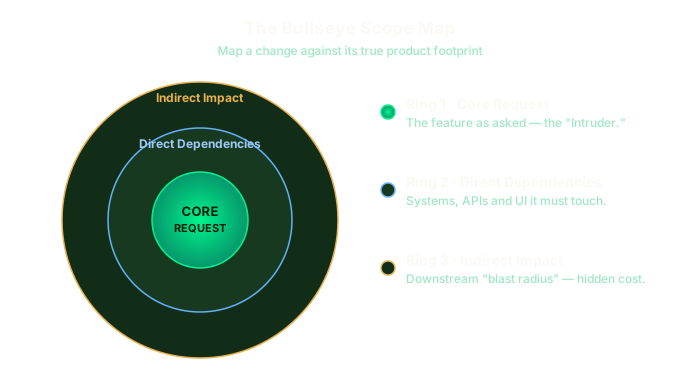
To build a Bullseye Map, open a digital whiteboard (Miro, FigJam, or Whimsical) and draw three concentric circles around the core request.
Ring 1: The Core Request (The "Intruder")
This is the feature as described by the stakeholder.
- Example: "Add promo code input field to the checkout page."
Ring 2: Direct Dependencies
These are the systems, APIs, and UI components that must directly interface with the core request to make it work.
- Example: Promo code validation API, database table for active codes, checkout state management, and error handling states for expired/invalid codes.
Ring 3: Indirect Impact (The Blast Radius)
These are the secondary systems, downstream processes, and operational workflows that will be affected by the change.
- Example: The Stripe billing integration (to pass the discount), the customer support admin portal (to issue manual overrides), financial reporting pipelines (to track tax implications on discounted goods), and automated regression testing suites.
Worked Example: The B2B SaaS "Custom Role" Request
Imagine you are building a team permissions page. A customer success manager asks to add "just one custom role" for an enterprise account.
| Ring | Component | Impacted Systems |
|---|---|---|
| Ring 1: Core | "Billing Viewer" Role | UI dropdown selection in Team Settings |
| Ring 2: Direct | RBAC Engine | Auth0 configuration, permission validation middleware, API endpoint authorization |
| Ring 3: Indirect | Downstream Systems | Audit logs, automated invitation emails, billing page access control, customer support impersonation tools |
By laying this out visually, you transform an abstract debate into a concrete system map. When you show a stakeholder a Ring 3 map containing nine impacted downstream systems, the psychological dynamic shifts. They realize their "simple button" is actually an architectural intervention.
Step 2: Auditing the Impact (The 4-Dimension Filter & Sizing)
Once you have mapped the structural impact, you must evaluate whether the feature deserves to bypass your prioritized roadmap. To do this, run the request through the 4-Dimension Filter.
First, work with your Tech Lead to get a rapid, high-integrity estimate. Do not run a full sprint grooming session. Use T-shirt sizes mapped to developer days:
- Small (S): 1–2 days. Low risk, localized change.
- Medium (M): 3–5 days. Touches Ring 2 systems; requires standard testing.
- Large (L): 2 weeks. Touches Ring 3 systems; requires cross-team coordination.
- Extra Large (XL): 4+ weeks. Significant architectural risk; requires security/data review.
Next, score the request from 1 (lowest) to 5 (highest) across four distinct dimensions:
1. Customer Value (JTBD Lens)
Does this solve a critical blocker for 80% of your target users, or is it a custom request for a single loud account? Use the Jobs-to-be-Done (JTBD) lens: Does this step directly help the user complete their primary job, or is it a workaround for an administrative edge case?
2. Technical Drag
What is the long-term maintenance cost? A feature that requires manual database maintenance or relies on a brittle third-party API has high technical drag, even if the initial build is fast.
3. Business Viability
Does this expansion directly move your team's current North Star metric, or is it a vanity metric? If your goal is retention, does this feature prevent churn, or is it just "nice to have"?
4. Usability & UX Debt
Does this add cognitive friction to the core user flow? Every checkbox, input field, and configuration option added to a product increases the cognitive load on the user, degrading the overall experience.
Calculating the Scope Priority Score (SPS)
Use this formula to calculate the overall priority of the proposed scope expansion:
$$\text{Scope Priority Score (SPS)} = \frac{\text{Customer Value} + \text{Business Viability}}{\text{Technical Drag} + \text{UX Debt}}$$
Score Interpretation:
- SPS > 2.0: High-value addition. Worth considering for immediate swap.
- SPS 1.0 - 2.0: Marginal value. Defer to the next planning cycle.
- SPS < 1.0: Definite rejection. The technical and UX drag outweighs the value.
Step 3: The Capacity Exchange & Lock-In (The "Scope Swap" Rule)
Product capacity is a zero-sum game. If your team is operating at sustainable capacity, you cannot add new scope without either extending the delivery date or removing an equivalent amount of work.
If you accept new scope without a trade-off, you are implicitly asking your engineering team to work overtime, cut QA corners, or ship buggy code.
The "Scope Swap" Protocol
When a high-priority request passes the 4-Dimension Filter (SPS > 2.0), present the requester with a clear choice. Use the Scope Swap Matrix:
| If they want to add... | They must agree to remove... | Or accept a delay of... |
|---|---|---|
| Small (1–2 days) | A minor priority backlog item | No delay (absorbed in buffer) |
| Medium (3–5 days) | A comparable mid-priority feature | 1 Sprint |
| Large (2 weeks) | A major roadmap milestone | 1 Month |
Calculating the Context-Switching Tax
When you pivot an engineering team mid-cycle, the cost is not just the build time of the new feature. You must also account for the Context-Switching Tax.
Every time a developer stops working on Feature A to start working on Feature B, they lose time tearing down their local environment, shifting their mental model, and setting up the new work.
$$\text{Actual Effort Cost} = \text{Estimated Effort} \times 1.25$$
Always apply a 25% context-switching tax to any mid-cycle estimate. If a Tech Lead says a change will take 4 days, budget it as 5 days in your capacity model to account for the disruption.
The "Scope Lock" Document
Once a swap is agreed upon, document the decision immediately. Do not rely on verbal agreements or Slack threads. Update your Product Requirement Document (PRD) with a "Scope Change Log" section:
### Scope Change Log
*   **Date:** October 24, 2024
*   **Requested Addition:** Custom coupon code validation field (SPS: 2.3)
*   **Approved Swap:** Deferred "Apple Pay Integration" to Q1
*   **Impact on Release Date:** Net-zero change to November 1st launch
*   **Sign-off:** [PM Name] / [VP of Sales Name] / [Tech Lead Name]
This version-controls your roadmap and prevents "scope creep on the creep."
Stakeholder Alignment: How to Say "No" (or "Not Now") with Data
Saying "no" is easy when you have a visual map and a quantitative score. It removes emotion from the conversation and positions you as a collaborative partner rather than a gatekeeper.
When delivering the decision, choose one of three strategic responses based on your audit results:
1. The "Yes, And..." (The Scope Swap)
Use this when the request has a high SPS (> 2.0) and makes strategic sense, but capacity is full.
"We mapped out the custom coupon request, and it touches our billing sync and financial reporting tools. It’s a solid idea that will help close the Enterprise deal. To build this and still hit our November 1st launch, we need to swap out the Apple Pay integration. If we swap those, we can start on coupons tomorrow. Do you want to make that trade?"
2. The "Not Now, But..." (The Backlog Postponement)
Use this when the request has marginal value (SPS 1.0–2.0) but is not worth disrupting the current delivery cycle.
"We ran the numbers on the custom role request. Because it touches our core authorization engine, it has high technical drag. If we build it now, we will delay the core launch by three weeks. We have placed this at the top of our v1.1 optimization backlog, which we will prioritize immediately after the core release."
3. The "No, Because..." (The Strategic Rejection)
Use this when the request fails the filter (SPS < 1.0).
"We evaluated the request to add custom roles. Our audit shows that this would add significant UX debt to our settings page, affecting all users to solve an edge case for one account. Additionally, the technical drag on our engineering team would delay our primary roadmap by a month. We cannot commit to building this feature because it conflicts with our goal of maintaining a simple onboarding experience."
Next Steps for Monday Morning
Do not wait for your next major project delay to try this. Implement this framework on Monday morning with these three steps:
- Audit Your Current Sprint: Identify any untracked, "small" requests that have slipped into your team's current cycle without a formal trade-off.
- Set Up Your Template: Create a reusable whiteboard template with the three concentric circles of the Bullseye Scope Map.
- Establish the Ground Rules: Share this article with your Tech Lead and key stakeholders. Agree on the 25% context-switching tax and the "one-in, one-out" rule before the next request arrives.
Tags
Related Articles

MoSCoW Prioritization: The Complete Guide for Product Managers
Learn how to use the MoSCoW method to prioritize product features and requirements effectively. Includes examples, templates, and best practices.

RICE Scoring: A Data-Driven Approach to Product Prioritization
Master the RICE scoring framework used by Intercom and top product teams. Learn to calculate Reach, Impact, Confidence, and Effort for better prioritization.

The Kano Model: Understanding What Really Delights Customers
Learn how the Kano Model helps product managers categorize features by their impact on customer satisfaction. Includes analysis techniques and real examples.