Designing for Trust: The PM’s Guide to Trust-First AI UX
Transition from deterministic to probabilistic software with this PM guide to trust-first AI UX. Learn to manage AI failures and build user trust.

Product Leader Academy
PM Education

If you have spent your career building traditional software, your product world has been beautifully, reliably deterministic. You write a functional specification that says: “If the user clicks button X, system action Y occurs, and data Z is updated in the database.” Your QA team writes test cases with binary pass/fail states. Your users build mental models based on cause and effect.
Then came generative AI.
When your product is powered by Large Language Models (LLMs) or complex machine learning algorithms, the deterministic contract is broken. Suddenly, your product is probabilistic: “If the user clicks button X, system action Y probably occurs, but sometimes Z happens, and occasionally, an entirely unexpected output W is generated.”
This shift from deterministic to probabilistic software completely upends the user experience. The "black box" nature of AI models introduces a new tax on your product’s growth: user anxiety, skepticism, and ultimately, churn.
As a product leader, you cannot solve this with a higher-accuracy model alone. A model with 95% accuracy will still fail, and when it does, how your product handles that failure determines whether the user stays or leaves.
To build successful AI-driven products, product managers must shift from an "accuracy-first" mindset to a "trust-first" UX framework. Trust is not a marketing problem, nor is it a legal disclaimer buried in your terms of service. Trust is a core design constraint.
This guide provides a practical, three-pillar framework for PMs and product designers to design, build, and measure trust in AI products.
Section 1: The Shift from Deterministic to Probabilistic UX
To design for trust, we must first understand how easily it is broken in the AI era. In traditional software, users expect perfection. In AI software, users are forced to manage probability. This creates a psychological gap that traditional UX patterns are ill-equipped to bridge.
The "Micro-Betrayals" of AI
In a traditional SaaS tool, a bug is usually obvious—a page doesn't load, or a button is unclickable. The user experiences frustration, but they understand it as a technical glitch.
With AI, the failures are often silent and insidious. A model might generate a highly confident summary of a financial report but hallucinate a key metric, changing a positive revenue growth figure to a negative one. This is a micro-betrayal.
Micro-betrayals are small, unacknowledged errors—a slow response, an awkward tone, or a subtle hallucination—that erode user confidence over time. If a user catches your AI in a lie just once, they will feel compelled to double-check every output thereafter. Once your user begins double-checking your product's work, the core value proposition of AI (saving time and cognitive effort) evaporates.
The Trust Curve in AI Adoption
When users interact with a new AI product, their trust typically follows a distinct curve:
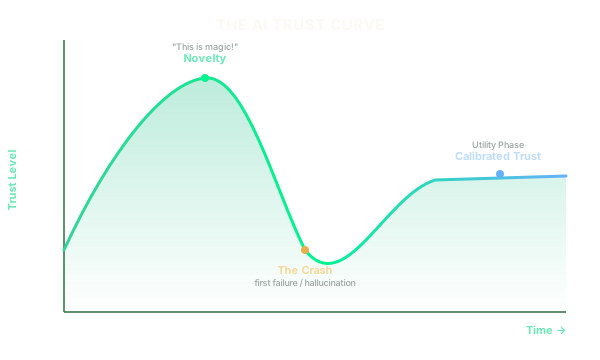
- The Novelty Phase: The user experiences the "magic" of AI. They write a simple prompt, receive a surprisingly coherent response, and their trust spikes. They assume the AI is highly capable across all domains.
- The Crash: The user relies on the AI for a high-stakes task. The AI hallucinates, fails to deliver, or produces a flat-out incorrect result. Because the UI did not warn them of this possibility, the user feels betrayed. Trust plummets.
- The Utility Phase: If the user doesn't churn immediately, they slowly reconstruct a realistic understanding of what the tool can and cannot do.
The PM's goal is to flatten this curve. Instead of allowing trust to spike and crash, we must aim for Calibrated Trust from day one. Calibrated trust means the user trusts the AI exactly as much as its current capability warrants—no more, and no less.
The Mental Model Gap and Trust Debt
Users naturally anthropomorphize AI, attributing human-like intelligence, intent, and reliability to it. This creates a massive Mental Model Gap—the difference between what the user thinks the AI can do and what the AI can actually do.
When your UI fails to bridge this gap, you accumulate Trust Debt. Trust debt is the accumulated skepticism and anxiety your users carry. The table below illustrates how deterministic UX patterns fail to address this debt compared to trust-first, probabilistic UX patterns:
| Aspect | Traditional/Deterministic UX | Trust-First/Probabilistic UX |
|---|---|---|
| System Output | Presented as absolute truth. | Presented as a draft, suggestion, or prediction. |
| Error Handling | Hard crash or generic error code (e.g., "Error 500"). | Humble explanation of model limitations with fallback options. |
| User Control | Binary inputs (clicks, keystrokes). | Continuous steering (sliders, tone adjustments, prompts). |
| Data Provenance | Implicit (assumed to be from the database). | Explicit (citations, sources, and step-by-step reasoning). |
| Feedback Loop | Occasional NPS surveys or crash reports. | Continuous, inline feedback integrated into the workflow. |
Section 2: Pillar 1: Calibrated Transparency (Explainability & Data Honesty)
The first pillar of Trust-First UX is Calibrated Transparency. You must show your users how and why the AI arrived at a specific output, and be radically honest about what data was used to generate it.
However, transparency does not mean dumping raw system logs or complex mathematical weights onto the screen. Too much technical jargon leads to cognitive overload, which actually decreases trust. The key is providing the right amount of context at the right time.
Just-in-Time Explanations
Do not force users to read a long guide on how your AI works during onboarding. Instead, use Just-in-Time Explanations—contextual micro-copy and UI indicators that appear precisely when the user is evaluating an AI-generated output.
- During Input: While the user is writing a prompt or configuring a task, provide inline hints about what the model excels at and where it struggles. (e.g., "Tip: This model works best with transcripts under 30 minutes.")
- During Processing: Instead of a generic loading spinner, use progress micro-copy that explains what the AI is doing. (e.g., "Analyzing 3 source documents..." -> "Synthesizing key themes..." -> "Drafting summary..."). This humanizes the process and sets expectations.
- During Review: Provide hover states or tooltips that explain the logic behind specific outputs.
The Danger of Confidence Scores (and How to Fix Them)
For years, data scientists have pushed to display statistical confidence scores in the UI (e.g., "Confidence: 92%"). To a user, however, "92% confident" is incredibly confusing. Does it mean there is an 8% chance the entire document is wrong? Or that 8% of the words are misspelled?
Instead of displaying raw statistical probability, translate those numbers into human-readable, actionable language:
- Bad: "Confidence Score: 87%"
- Better: "High certainty based on 14 matching sources."
- Bad: "Confidence Score: 41%"
- Better: "Low certainty. We found conflicting information in your source files. Please verify the highlighted sections."
Visualizing Data Sources (Citations & Provenance)
If your AI product generates factual claims, summaries, or insights, you must give users a trail of breadcrumbs to verify those claims. This is why search engines like Perplexity have gained rapid adoption: they do not just give an answer; they show their work through prominent, clickable source cards.
Sample AI answer:
According to our analysis, your Q3 marketing spend increased by 14% [1], primarily driven by paid search campaigns [2].
Sources: [1] Q3_Financial_Statement.pdf (Page 4) [2] Adwords_Export_Oct2023.csv (Row 112)
By providing inline citations, you transform the user's role from a skeptical reader to an efficient editor. They can quickly click a source, verify the context, and move on with confidence.
Data Privacy Transparency
In the B2B SaaS world, the biggest blocker to AI adoption is data privacy. Users are terrified that their proprietary data, customer records, or intellectual property will be used to train public models, leading to data leaks.
To build trust, your UI must make data security boundaries explicit and visible:
- Enterprise Shields: If you offer an enterprise tier where data is not used for training, display a persistent, reassuring badge in the UI (e.g.,
"Enterprise Data Shield Active"). - Clear Toggles: Allow users to see and control their data settings directly within the workspace, rather than burying it deep within an account settings page.
Section 3: Pillar 2: Active User Agency (Steering, Feedback, & Consent)
Trust is built when users feel in control. If an AI system acts as an autonomous "black box" that simply hands down finalized outputs, the user feels disempowered. If the output is wrong, their only option is to throw it away.
To foster trust, we must design for Active User Agency—moving the relationship from automation (the AI does it all) to co-creation (the user and AI collaborate).
The "Steering Wheel" Pattern
Instead of forcing users to rely entirely on open-text prompts—which suffer from the "blank page syndrome" and require prompt engineering skills—provide intuitive UI controls that let users "steer" the AI on the fly.
Consider these interactive steering UI patterns:
- Tone and Style Sliders: Let users adjust outputs along a spectrum (e.g., from Concise to Detailed, or Professional to Playful).
- Format Toggles: Allow users to instantly switch the output format (e.g., convert a paragraph draft into a bulleted list or a table) with a single click.
- Focus Selectors: Let users explicitly select which parts of their input the AI should prioritize (e.g., "Focus primarily on financial metrics" vs. "Focus on strategic takeaways").
Designing Meaningful Feedback Loops
A simple "Thumbs Up / Thumbs Down" icon is the default feedback mechanism for most AI features. However, it is fundamentally broken. It offers zero context to the product team, and it provides no immediate value to the user. Why should a busy user take the time to click a button just to help your data science team train their models?
Instead, design feedback loops that are mutually beneficial. When a user corrects an AI output, that correction should immediately update their current workspace while silently sending structured feedback to your engineering team.
When a user highlights text and clicks "Make more professional," a single action drives two outcomes at once:
- UI action: the highlighted text is instantly rewritten inline
- Backend action: the change is logged as a successful "steering" event
If you do use thumbs up/down icons, make them interactive. Clicking "Thumbs Down" should instantly open a small, low-friction overlay with pre-populated options:
- “Too long”
- “Factually incorrect”
- “Wrong tone”
- “Missed key instructions”
This gives your team actionable data to run evaluations while showing the user that their input is valued and processed.
The "Human-in-the-Loop" Sandbox
Never publish, send, or commit an AI-generated output on behalf of a user without their explicit review.
If your AI tool drafts emails to clients, generates code, or updates database records, present these outputs in a clearly marked "Sandbox" or "Draft" state. The user must actively review, edit, and click "Approve" before the action is executed.
Notion AI executes this brilliantly. When you ask Notion to write or edit text, it displays the output in a temporary block with clear options: Keep, Try Again, Make Longer, or Discard. The AI does not permanently overwrite the user’s document until they click Keep.
The "Opt-Out" Safeguard
Agency also means giving users the right to say "no." Ensure your settings panel contains clear, human-readable toggles regarding data usage. If your users know they can opt-out of model training at any moment with a single click, they will feel significantly more comfortable experimenting with your tool in the first place.
Section 4: Pillar 3: Graceful Degradation and "Humble UI"
Every AI model will eventually fail. The difference between a product that retains its users and one that loses them forever lies in how it fails.
Graceful Degradation is the design practice of ensuring that when a system component fails, the overall product continues to operate in a limited, but still useful, capacity. In AI UX, this is supported by a "Humble UI"—an interface design that embraces its own limitations and handles errors with humility and clarity.
Designing Humble Copywriting
The language your UI uses to present AI features sets the foundation for user expectations. Arrogant copy creates high expectations and deep disappointment; humble copy sets realistic expectations and builds tolerance for errors.
Avoid definitive, authoritative language. Instead, use collaborative, suggestive phrasing:
- Arrogant UI: "Here is the summary of your meeting." (Implies 100% accuracy and completeness).
- Humble UI: "Here is a draft summary based on the meeting transcript. Please review for accuracy." (Implies a starting point that requires human oversight).
- Arrogant UI: "I have found the answer to your question."
- Humble UI: "Based on the 3 documents provided, here is what I found:"
Handling Edge Cases and Empty States
When an LLM times out, encounters a safety filter, or returns a low-confidence response, do not display a generic error message or, worse, a blank screen.
Design specific, helpful empty states that guide the user on how to recover:
Hmm, I'm a bit stuck.
I couldn’t find a clear answer in your uploaded documents. This usually happens when:
- The document is scanned or handwritten
- The answer requires external web search (which is off)
What you can do: Try a broader prompt · Enable web search · Ask Support
The "Safety Valve" Pattern
When the AI fails repeatedly, the user needs an escape hatch. This is the Safety Valve pattern. If your product detects that a user is rewriting an AI output multiple times, or if they are repeatedly entering prompts in a short period (indicating frustration), the UI should offer an easy path to manual override or human support.
For example, if an AI customer service bot cannot resolve an issue after two turns, it should not keep repeating itself. It should gracefully degrade by saying: "I don't think I'm giving you the right answer. Let me connect you directly to a human support agent."
Section 5: The Trust-First Product Roadmap: A PM Playbook
Building a trust-first AI product requires more than just designing pretty interfaces; it requires changing how you plan, write requirements for, and build your product.
Writing PRDs for Probabilistic Features
Traditional Product Requirement Documents (PRDs) are built around binary functional requirements. For AI features, you must write PRDs that define acceptable error bounds and trust constraints.
When writing an AI PRD, include a dedicated "Trust & Safety" section that answers the following questions:
- What is the acceptable accuracy threshold for launch? (e.g., The model must achieve an 85% precision rate on our evaluation dataset before entering Beta.)
- What is the fallback experience when confidence is low?
- What are the safety guardrails? (e.g., The system must detect and block inputs containing PII before sending them to the LLM API.)
Here is an example of how to structure a "Trust Constraint" in your PRD:
### Feature: AI-Generated Invoicing Summaries
*   **User Value:** Saves accounting teams time by summarizing complex invoices.
*   **Trust Constraint TC-1 (Low Confidence Fallback):**
    *   *Condition:* If the model's confidence in parsing the "Total Due" field is below 95%.
    *   *UI Behavior:* Do not auto-populate the field. Instead, leave the field empty, highlight it in yellow, and display a tooltip: "Please enter manually. We couldn't parse this figure with high certainty."
Cross-Functional Alignment: Data Science vs. UX
In many product organizations, there is a cultural divide between data scientists and product designers. Data scientists live in the world of offline metrics: F1 scores, perplexity, recall, and precision. Designers live in the world of online metrics: cognitive load, task completion rate, and user satisfaction.
As the PM, you must bridge this gap. Align your team around system-level outcomes rather than model-level metrics.
For example, a data scientist might argue that a 2% increase in model accuracy is worth a 3-second increase in latency. Your designer will argue that a 3-second delay will destroy user trust. Your job is to facilitate this trade-off, perhaps by suggesting a humble UI pattern (like progress micro-copy) that makes the latency feel shorter to the user.
Red Teaming for Trust
Before launching any AI feature, conduct a Red Teaming session with your cross-functional team (Product, Design, Engineering, QA, and Security).
The goal of a Red Teaming session is to actively try to break your own AI system's trust boundaries. Spend half a day trying to:
- Force the AI to hallucinate incorrect information.
- Prompt-inject the system to reveal system prompts or hidden instructions.
- Input toxic, biased, or inappropriate prompts to see how the system responds.
- Input edge-case data (e.g., empty files, massive datasets, foreign languages) to test the graceful degradation UI.
Document every vulnerability discovered and categorize them not just by technical severity, but by Trust Impact.
Section 6: Measuring Trust (The PM's Dashboard)
You cannot manage what you do not measure. While you should continue to track classic SaaS metrics (DAU, retention, NPS), you must also build a dedicated Trust Dashboard to monitor how well your AI UX is performing in the wild.
To measure trust effectively, track a mix of quantitative behavioral signals and qualitative feedback:
Quantitative Trust Signals
- 1. Correction Rate (CR):
- Definition: The percentage of AI-generated outputs that users manually edit, overwrite, or delete.
- How to calculate:
(Number of edited AI outputs / Total number of accepted AI outputs) * 100 - Interpretation: A high Correction Rate indicates that your AI is generating low-quality outputs or that your users do not trust the initial drafts, forcing them to spend time fixing them.
- 2. Feedback Engagement Rate (FER):
- Definition: The percentage of users who actively interact with your feedback mechanisms (thumbs up/down, edit suggestions, report buttons).
- How to calculate:
(Total feedback interactions / Total AI outputs generated) * 100 - Interpretation: If this rate is extremely low, your feedback loops are likely too high-friction or offer no immediate value to the user.
- 3. Opt-Out Rate:
- Definition: The percentage of users who navigate to settings and disable AI features or opt-out of data training.
- Interpretation: A sudden spike in opt-outs is a clear warning sign of a foundational trust issue, often triggered by a public security concern or a poorly communicated change in your privacy policy.
- 4. Prompt Abandonment Rate:
- Definition: The percentage of times a user starts typing a prompt or initiating an AI task but cancels or closes the window before executing it.
- Interpretation: High abandonment rates suggest that users find the prompting experience confusing, intimidating, or slow.
Qualitative Trust Signals
Quantitative data tells you what is happening; qualitative data tells you why. Implement these qualitative research practices:
- The "Control" Interview Protocol: During user interviews, don't just ask, "Do you like the AI feature?" Ask specific, control-oriented questions:
- "Did you feel like you knew what the AI was doing behind the scenes?"
- "If the AI made a mistake, how easily could you correct it?"
- "How did you verify that this summary was correct?"
- Analyzing "Trust Churn": When users cancel their subscriptions, look closely at their exit surveys. Create a specific churn category for "Loss of Trust in AI Output" or "Data Privacy Concerns" to isolate trust-related churn from standard feature-fit churn.
Conclusion & Next Steps
In the era of commoditized LLMs, proprietary models are rarely a sustainable moat. APIs are accessible to everyone, and model capabilities are rapidly converging.
The ultimate competitive advantage in the AI era is not the model you use; it is the user experience that delivers and sustains trust.
By designing your product around the three pillars of Trust-First UX—Calibrated Transparency, Active User Agency, and Graceful Degradation—you can transform your AI features from unpredictable black boxes into reliable, collaborative partners that users feel comfortable integrating into their daily workflows.
Your Trust-First Checklist for Monday Morning:
- Review your copy: Audit your product’s UI text. Replace arrogant, definitive statements with humble, collaborative phrasing.
- Map the escape hatches: Identify the three most common failure points in your AI features. Do you have a "safety valve" or a graceful fallback UI in place for each?
- Add a citation: If your AI makes factual assertions, design a simple, just-in-time visual citation pattern so users can verify the source data.
- Draft a Trust Constraint: For your next product feature, write at least one non-functional trust constraint directly into your PRD.
Want to master the strategic side of AI product management? Download Product Leader Academy's AI Product Strategy Framework or apply to join our upcoming Product Leadership in the AI Era cohort to learn how top-tier product leaders build, scale, and secure trust-first AI products.
Tags
Related Articles
The Orchestrator PM: Leading Product in the Age of Agentic AI
Discover how agentic AI is redefining product management. Shift from administrative ticket writing to orchestrating autonomous agents for strategic leverage.

The AI-Augmented PM: Eliminating Ops Debt and Scaling Strategic Impact
Discover how AI-augmented PMs eliminate product ops debt, automate feedback synthesis, and reclaim their calendars to scale their strategic product impact.
Beyond the Chatbot: Mastering AI Orchestration
Move beyond simple chatbot wrappers. Learn why AI orchestration is key to solving high latency, skyrocketing API costs, and user churn in the agentic era.